

Wow! Frequency Equalizer Pro. Five Bands Separation Plugin
Wow! is an exclusive Photoshop plugin that let you easily boost or smooth each frequency range. Wow! adds style, image sharpness and three-dimensionality together with incredibly smooth transitions. Use our easy presets with just one button, or take full control with the high quality live preview to add and remove details by tweaking our five dedicated sliders.
The new Decompose button is a new exciting exclusive feature of Wow! Frequency Equalizer Pro. You can now explicitly turn each frequency into its own pixel layer (five of them are created in a stack, plus a base layer) for a better and more precise frequency based retouching.
You can paint, clone and heal on the very exact frequency layer that contains the features you need to target, with great precision, giving you unprecedented control over the retouching process.
- Super fast five bands separation with sliders 75%
- Five bands plus a base layer separation with editable pixel layers 100%
- Double engine and algorithm for standard and web sized files 50%
Frequency Separation With Sliders
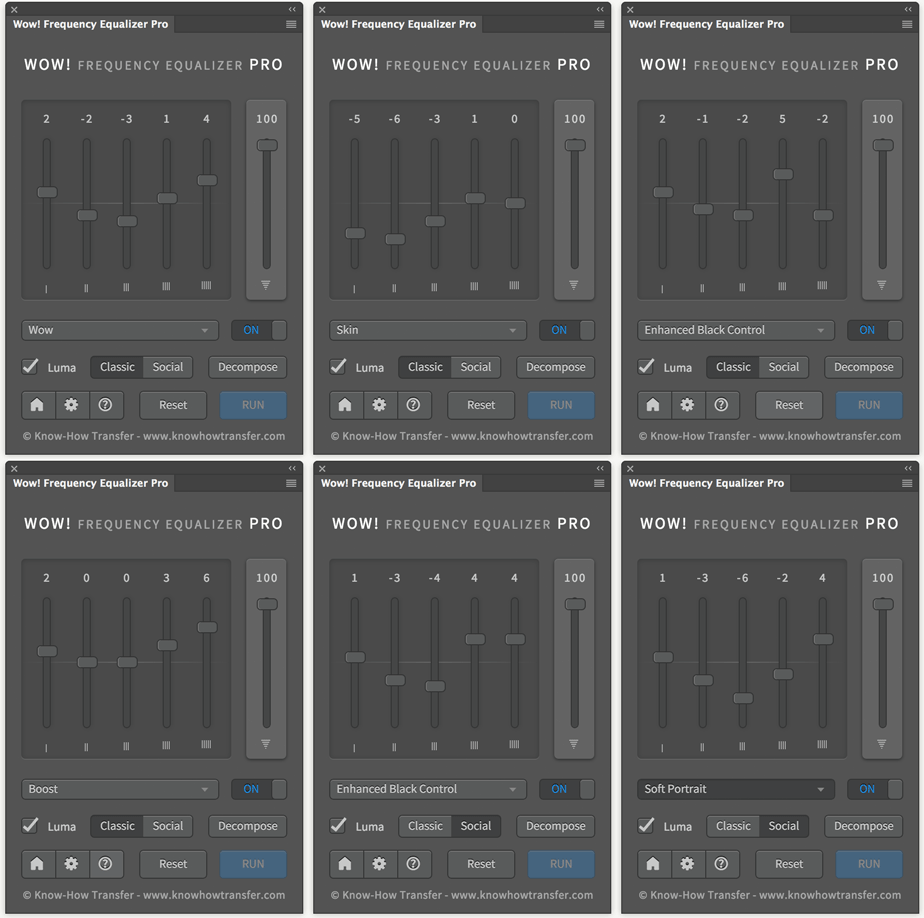
Here the Wow! Pro interface. There are basically two ways you can go. The first: you start tweaking the sliders until you get a satisfactory result. The second, faster an easier: you start from one of the presets enclosed in Wow! Choosing a preset from the menu, the sliders will change their position and set themselves in a given configuration.
The sliders correspond to five spatial frequency bands; left to right, the bands correspond to high frequencies which become progressively lower. If you prefer: detail is on the left, shape is on the right. The intermediate bands work on intermediate scales.
Each slider can be either boosted or cut: a boost corresponds to an enhancement of a given band, a cut corresponds to a reduction. Sliders can be combined, of course, in whatever ratio. The effect may not be easily predictable at times, and it strongly depends on the image you are working on. Also, notice the sixth slider: you may think of it as the intensity of the overall effect, a bit like opacity: 100 is maximum (and the default) and 0 is minimum, corresponding to no effect.

Frequency Separation With Editable Layers
We have seen that Wow! works on five different frequency layers, but where these layer are? Well, they’re hidden: you actually manipulate them with the sliders, but there’s nothing else you can do, unless you use Decompose button.
This new exciting feature of Wow! Frequency Equalizer Pro decompose the image in six different layers: what scientists call a “pyramid”. Each one of these addresses a different frequency. Bottom to top: a base layer image, extremely blurred, followed by decreasing frequency layers. The smaller the frequency, the finer the detail.
These are real layers, that you can manipulate at will for a better and more precise frequency based retouching.
You can paint, clone and heal on the very exact frequency the layer that contains the features you need to target, with great precision, giving you unprecedented control over the retouching process.
If for instance the layer named Scale 2 seems to be responsible for most of the skin blemishes, using the Clone Stamp tool on it sounds like a brilliant idea. This doesn’t change the remaining frequencies, so that every layer addresses a single and peculiar characteristic of the image. In the case shown here we added a clipped curve to modify the contrast of the Scale 3 and a layer mask on the Decompose group.
“Lots of possibilities for the decomposing layers, the level of tweak/control is amazing like sharpening the main object and with some masking in the Scale1 layer making rest less sharp… applying a curve to the right frequency… WoW! :)”
“Hours have been reduced to seconds in frequency separation with brand new Wow!”
Tutorials

Compatibility, version, and manual
Mac: OSX7 Lion and later, OSX Sierra included
WIN: Vista and later, WIN10 included, 64bit only
Not compatible with CS6, sorry
Current Version 1.5.1
Read or download the user manual
More great plugins from Know-How Transfer
Our plugins are designed for Photographers and built to make their work easier, faster and more qualitative. To pursue our goals, we removed from applications everything that’s not indispensable, and we made sure that user interfaces are simple yet functional. All our products are powered by by algorithms working internally at 32bit, and work seamlessly on 8, 16, and 32bit.


Read more or buy
Read more or buy
Read more or buy